
What is inventory checking on Amazon?

Most Amazon sellers assume their stock figures look after themselves. They list a product, send it to a fulfilment centre, and trust that Amazon’s systems will keep everything accurate. That assumption is what inventory checking Amazon is designed to challenge. In reality, inventory checking is an active, ongoing seller responsibility that directly shapes your performance metrics, your storage limits, and ultimately your sales. This guide covers what inventory checking means on Amazon, how to do it well, and what happens when you don’t.
Table of Contents
Key takeaways
Point | Details |
Inventory checking is active, not passive | Amazon does not automatically protect your stock accuracy; sellers must review and reconcile figures regularly. |
IPI score is heavily tied to inventory health | Excess inventory and sell-through rate together account for 70 to 80% of your IPI score. |
Stranded inventory is the fastest fix | Resolving listing errors that cause stranded inventory improves your IPI score quicker than chasing stockouts. |
A daily routine prevents compounding errors | A 15-minute daily check catches sync failures, order exceptions, and low-stock situations before they escalate. |
In-transit stock is a common blind spot | Inventory moving between Amazon facilities often disappears from standard reports and must be tracked manually. |
How inventory checking works on Amazon
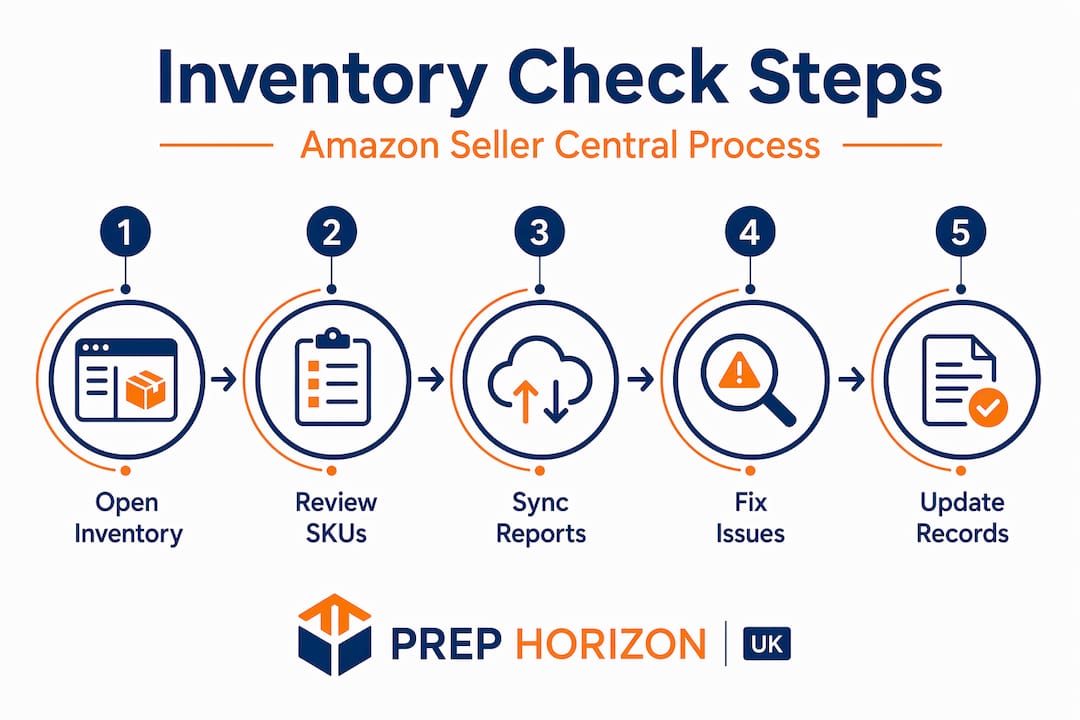
Understanding Amazon inventory starts with knowing where to look. Your primary tool is the Manage Inventory page inside Seller Central. From there you can view individual listing quantities, check status flags, update stock counts, and spot listings that have gone inactive or stranded.
For sellers with larger catalogues, Amazon also offers the Inventory Loader, a bulk upload tool that handles up to 600 SKUs per file using a flat Excel-formatted spreadsheet. This is useful for pushing quantity updates across many products at once, but it carries risk. A single formatting error can overwrite correct figures with wrong ones, and Amazon’s system may not flag the mistake immediately.
One aspect of inventory tracking Amazon sellers frequently misunderstand is the difference between three inventory states:
Available inventory is what Amazon currently shows as purchasable on your listing.
Reserved inventory covers units tied to open orders or pending shipment transfers.
In-transit inventory is stock moving between facilities, which often becomes invisible in standard reports and must be tracked separately.
Real-time syncing between your own systems and Seller Central is never guaranteed. If you use a third-party multichannel tool, there is always a lag. Silent sync failures, where your software reports a successful update but Amazon’s system does not reflect it, are more common than sellers expect. Checking directly inside Seller Central, rather than relying on dashboard numbers from a third-party tool, gives you the most accurate picture.
Pro Tip: When using bulk inventory uploads via Inventory Loader, always download a fresh inventory report from Seller Central after 30 minutes to confirm the quantities updated correctly. Do not assume the upload succeeded.
Key metrics tied to inventory health
Inventory checking is not just a logistics task. It connects directly to your Inventory Performance Index, or IPI, which Amazon uses to determine your storage limits and overall account health.

The IPI score is driven primarily by excess inventory percentage, which carries 40 to 45% of the total weighting, and sell-through rate, which accounts for 30 to 35%. Combined, those two factors represent 70 to 80% of your score. Amazon targets an excess inventory rate below 5% and a sell-through rate above 7 units sold per day per 1,000 units on hand. If you are sitting on slow-moving stock, your IPI suffers before you even run out of faster-moving product.
Sellers often focus on stockouts as the main IPI threat, but the picture is more nuanced. Stockouts affect your In-Stock Rate metric rather than directly deducting IPI points. Stranded inventory, by contrast, is one of the top direct causes of IPI reduction and is frequently within a seller’s control to fix quickly.
Common mistakes that damage inventory metrics include:
Leaving inactive or error-flagged listings open with zero stock, which pulls down your In-Stock Rate.
Ignoring stranded inventory notifications in Seller Central for days or weeks.
Failing to close listings for products you have discontinued before stock reaches zero.
Holding large quantities of slow-moving stock that inflates your excess inventory percentage.
Solo sellers managing between 20 and 200 SKUs experience an average of 2 to 4 stockouts per quarter, with significant annual costs attached. Accurate reorder points and safety stock calculations reduce that number considerably, but only if you are checking inventory data frequently enough to act on it.
Common pitfalls in Amazon inventory checking
Even sellers who check their inventory regularly run into problems that are not immediately obvious. The most damaging ones share a common thread: they are quiet. They do not trigger alerts, they do not cause immediate sales drops, and they compound slowly until the damage is significant.
Here are the most frequent pitfalls and how to address them:
Ignoring in-transit inventory. When stock moves from Amazon’s bulk storage to a fulfilment centre, it frequently disappears from reports during the transfer. Sellers who do not track this manually will either over-order and create excess stock or under-order and face a stockout they did not see coming.
Silent sync failures. If you rely solely on third-party software to manage your stock levels, a failed sync can leave your Seller Central quantities wrong for hours or days. By the time you notice, you may have oversold or lost the Buy Box.
Leaving low-margin listings active at zero stock. This is a mistake that affects sellers who are winding down a product range. Letting a listing sit at zero units without closing it properly quietly harms your In-Stock Rate and, by extension, your IPI.
Stranded inventory left unresolved. Stranded inventory typically results from a listing error, a shipment issue, or a suppressed ASIN. Amazon flags it in Seller Central, but many sellers dismiss these notifications without acting. Resolving stranded inventory is one of the most impactful ways to improve your IPI score quickly.
Infrequent inventory checks creating compounding errors. One incorrect quantity figure is easy to fix. Five incorrect figures across a catalogue, all drifting further from reality each day, create a genuinely difficult reconciliation problem.
Pro Tip: Set aside time once a week to review your Seller Central notifications specifically for stranded inventory alerts. These are fixable within minutes in most cases, and resolving them has an outsized positive effect on your account health.
Best practices for Amazon inventory management
Getting your inventory checking under control does not require complex software or a dedicated operations team. What it does require is consistency. The best sellers treat inventory as a strategic function that integrates forecasting, supplier lead times, and spend patterns, rather than a reactive task they address when something goes wrong.
The table below outlines a practical approach to daily versus weekly inventory management:
Task | Frequency | Purpose |
Review sync status and order exceptions | Daily | Catch silent errors before they impact orders |
Check low-stock alerts and reorder triggers | Daily | Prevent stockouts on fast-moving lines |
Spot-check 5 random SKUs for accuracy | Daily | Touch 25% of a 400-SKU catalogue monthly |
Review PO pipeline and delivery confirmations | Daily | Track inbound stock and in-transit inventory |
Review stranded inventory and IPI notifications | Weekly | Protect account health and storage limits |
A 15-minute daily routine built around these tasks is one of the most reliable ways to separate high-performing sellers from those who are constantly firefighting. The routine works because it is short enough to actually complete every day, yet structured enough to catch the errors that matter.
When calculating reorder points, use this straightforward formula:
Calculate your average daily sales velocity for each SKU over the past 30 days.
Identify your supplier lead time in days, including transit to your prep centre.
Add a safety stock buffer, typically 7 to 14 days of sales for most product categories.
Set your reorder point at: (daily velocity × lead time) + safety stock.
Monitoring days of cover alongside this formula gives you an early warning signal. If a product has 18 days of cover and a 21-day lead time, you need to order today, not next week. This level of visibility only exists if you are checking inventory figures regularly enough to catch the gap.
What I’ve learned from real inventory checking mistakes
From where I sit, having worked with Amazon sellers across a wide range of catalogue sizes, the single biggest inventory mistake is not the stockout itself. It is the attitude that stockouts are unavoidable. They rarely are.
What I’ve seen is that sellers who struggle with inventory accuracy share a common habit: they check their numbers reactively. Something breaks, a sale is lost, a suppressed listing triggers a complaint, and only then do they open Seller Central. By that point, the error has usually been running for days.
The sellers who stay on top of their inventory treat the daily accuracy routine the same way they treat checking their email. It is not optional. It takes 15 minutes, it is not glamorous, and it prevents an enormous number of preventable problems.
My honest view is that most sellers underestimate how much stranded inventory is quietly costing them. It sits there in Seller Central, flagged in a notification most people dismiss, and it drags down the IPI score week after week. Resolving it takes five minutes in most cases. Yet I’ve seen sellers lose significant storage limits because they never clicked through to fix it.
The best advice I can offer is this: do not wait for your IPI to drop before you start taking inventory checking seriously. By the time the score moves, the problem is already weeks old.
— Prep
How Prephorizonuk supports your inventory accuracy
When your inbound shipments are packed correctly, labelled accurately, and sent to Amazon with compliant documentation, your inventory checking process becomes far simpler. The errors that cause stranded inventory and sync failures most often start before stock even reaches a fulfilment centre.

Prephorizonuk is a UK-based FBA prep centre built specifically to reduce those upstream errors. We handle receiving, inspection, labelling, and shipment creation so that what Amazon receives matches what your Seller Central account expects. Sellers who use a professional FBA prep service spend less time reconciling inventory discrepancies and more time managing their business. If you want to understand exactly what goes into getting your stock checked in correctly, our guide on inspecting Amazon inventory walks through the process in detail. You can also review our service pricing to find a plan that fits your catalogue size and volume.
FAQ
What does inventory checking mean on Amazon?
Inventory checking on Amazon refers to the active process of reviewing, verifying, and reconciling your stock quantities across Seller Central. It includes monitoring available, reserved, and in-transit inventory to prevent stockouts, overselling, and account penalties.
How do I check my inventory on Amazon Seller Central?
You can check inventory via the Manage Inventory page in Seller Central for individual SKUs, or use the Inventory Loader to review and update up to 600 SKUs at once using a flat file upload.
How does inventory checking affect my IPI score?
Your IPI score is heavily influenced by excess inventory percentage and sell-through rate, which together account for 70 to 80% of the total score. Unchecked stock issues, particularly stranded inventory, can reduce your score and restrict your storage limits.
What is stranded inventory on Amazon?
Stranded inventory is stock held at an Amazon fulfilment centre that is not linked to an active listing, usually due to a listing error or suppressed ASIN. It does not appear available for purchase and directly harms your IPI score until resolved.
How often should I check my Amazon inventory?
Most experienced sellers recommend a daily 15-minute routine covering sync status, low-stock alerts, order exceptions, and spot-checks on random SKUs, supplemented by a weekly review of IPI notifications and stranded inventory flags.
Recommended
Comments