
Streamline FBA inbound shipments for better Amazon sales

Many UK sellers lose money and time on FBA inbound shipments not because they ship the wrong products, but because they mishandle the process that gets those products into Amazon’s fulfilment network. Every box you send to an Amazon fulfilment centre passes through a defined set of steps that directly controls when your inventory goes live and starts generating sales. Skip a step, mislabel a carton, or submit an inaccurate shipping plan, and your stock can sit in a holding pattern for days or even weeks. This guide covers the full inbound shipment process, the statuses that matter, and the compliance errors that quietly drain seller performance.
Table of Contents
Key Takeaways
Point | Details |
Define FBA inbound shipment | It means sending your products to Amazon fulfilment centres so Amazon can handle customer orders. |
Process accuracy matters | Correct planning, labelling, and compliance prevent costly delays and ensure faster sales. |
Track shipment statuses | Monitoring your shipment’s progress keeps you in control and helps resolve problems quickly. |
Avoid common pitfalls | Label mismatches and ASN errors are the top reasons for receiving delays and should be checked upfront. |
What is an FBA inbound shipment?
Before you can fix problems, you need a precise picture of what an FBA inbound shipment actually is. Put simply, an FBA inbound shipment is the inventory you send into Amazon’s fulfilment network, the opposite of outbound shipments that Amazon dispatches to your customers. You are not shipping to a buyer. You are shipping to a warehouse so that Amazon can pick, pack, and deliver on your behalf.
The distinction matters because the two flows have completely different requirements. Outbound logistics is Amazon’s responsibility. Inbound logistics is yours. That means you are accountable for the quality of your packaging, the accuracy of your labels, the contents of each carton, and the paperwork that accompanies every pallet.
Key elements that define an FBA inbound shipment include:
Origin: Your supplier, your home, or a third-party prep centre
Destination: An Amazon fulfilment centre (FC) assigned during the shipping plan process
Trigger: A shipping plan created in Seller Central
Documentation: Shipment IDs, box content information, and FNSKU labels
Compliance scope: Packaging standards, labelling rules, and quantity accuracy
Understanding these elements is essential before you ever book a courier. If any element is wrong, Amazon’s receiving team either rejects the shipment or places it in a compliance queue, both of which delay your inventory going live. Reviewing a thorough shipment inspection checklist before despatch is one of the most practical habits you can build early.
A useful way to think about it: inbound shipments are your half of the FBA partnership. Amazon handles the customer experience once stock is received. Your job is to make receiving as frictionless as possible.
Step-by-step: The FBA inbound shipment process
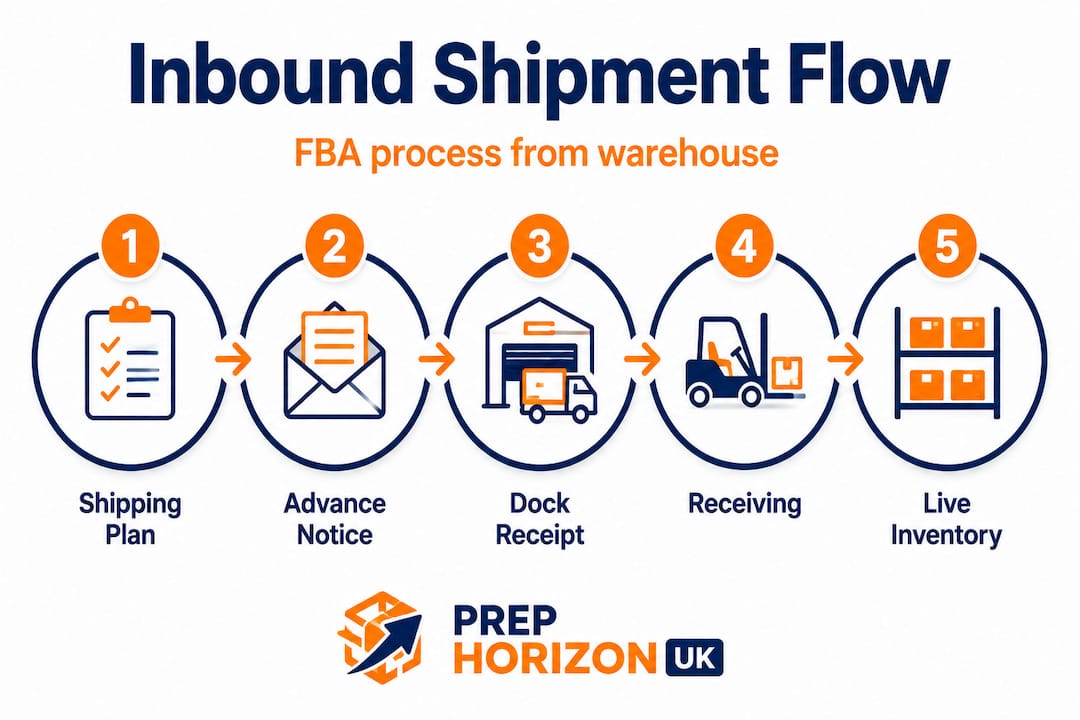
With the basics defined, you will now see exactly how an FBA inbound shipment proceeds from your warehouse to live, sellable inventory. The journey has distinct stages, and each stage depends on the accuracy of the previous one.
The shipping plan in Seller Central specifies your SKUs, quantities, packing details, and generates the shipment labels and routing instructions to your assigned fulfilment centre. This is where the entire inbound process originates, and errors here compound at every stage that follows.
Here is the full operational flow:
Create a shipping plan in Seller Central. Select your products, enter quantities per SKU, and confirm whether you are sending individual units or case-packed items.
Generate shipment IDs and labels. Amazon assigns one or more shipment IDs. Print FNSKU labels for each unit and box content labels for each carton.
Prepare and pack your inventory. Follow Amazon’s packaging requirements per product category. Ensure units are bagged, bundled, or wrapped as required.
Send your advance shipment notification (ASN). The shipping plan serves as your ASN. This tells Amazon what is coming, in what quantities, and in how many cartons.
Despatch to the fulfilment centre. Use an approved carrier or a partnered carrier through Amazon’s Partnered Carrier Programme for cost-effective delivery.
Amazon receives the shipment. The FC team issues a dock receipt, scans cartons, and begins counting units against your ASN.
Inventory is stowed. After counting and compliance checks, units are physically stowed in the FC, at which point they become available for sale.
The inbound shipment flow includes an advance notice or ASN created from the shipping plan, followed by a dock receipt and scanning or counting against that advance notice, and finally stowing so units become available for sale after check-in. The timeline between step five and step seven is where most sellers experience frustrating delays.
Stage | Who is responsible | What can go wrong |
Shipping plan creation | Seller | Wrong quantities, missing SKUs |
Labelling | Seller / prep centre | FNSKU errors, missing labels |
Packing | Seller / prep centre | Non-compliant packaging |
ASN submission | Seller Central (automated) | Mismatch vs. physical shipment |
Dock receipt | Amazon FC | Carrier delays, missing paperwork |
Scanning and counting | Amazon FC | Discrepancies trigger holds |
Stowing | Amazon FC | Compliance failures delay this step |

Pro Tip: Never send a shipment before confirming your FNSKU labels match the shipping plan exactly. A single label mismatch can prevent Amazon’s scanners from associating your physical units with your Seller Central records, which triggers a manual review and delays stowing by several days.
For detailed guidance on getting your stock ready before it leaves your hands, the article on preparing inventory for FBA walks through every packaging and labelling requirement in practical terms. It is well worth reading alongside your inbound compliance guide to ensure nothing falls through the gaps.
Key statuses and tracking your inventory
Once you understand the step-by-step journey, tracking and correcting issues at each stage becomes much simpler. Amazon’s Seller Central displays a set of statuses for every active or closed inbound shipment, and knowing what each one means tells you exactly where your inventory sits in the pipeline.
Amazon’s UK guidance notes shipment statuses such as Delivered, Checked-in, Receiving, and Closed, each representing a distinct stage in the fulfilment centre’s processing workflow. Here is what each status means in practice:
Status | Meaning | Action required |
Working | Shipping plan created but not yet sent | Complete your plan and confirm the shipment |
Shipped | Carrier has collected; Amazon awaiting arrival | Monitor tracking; ensure carrier updates |
Delivered | FC has confirmed physical arrival | No action, wait for check-in |
Checked-in | FC has begun processing your shipment | Monitor for Receiving status |
Receiving | Units being scanned and counted | Check for discrepancies in real time |
Closed | All units accounted for and stowed | Inventory is live and sellable |
The critical window for sellers is between Delivered and Closed. If your shipment stays at Checked-in or Receiving for more than a few business days without progressing, it often signals a discrepancy between your declared contents and what Amazon’s team physically finds.
Common reasons inventory gets stuck include:
Quantity discrepancies: You declared 100 units but the carton physically contains 98
Labelling issues: FNSKUs are smudged, covered, or printed at the wrong size
Product condition flags: Items appear damaged or do not meet FC standards
Barcode conflicts: Two different products sharing a barcode or an FNSKU assigned to the wrong product
“If your shipment sits at ‘Receiving’ for longer than five business days, open an investigation in Seller Central immediately. Do not wait. The longer you leave it, the harder it becomes to reconcile discrepancies and the greater the impact on your available inventory and sales rank.”
For a broader view of how to stay on top of your stock health beyond just inbound status, the guide on managing FBA inventory is an essential read for any seller scaling their catalogue.
Common pitfalls and compliance errors to avoid
Avoiding problems is as critical as understanding the process. Let us spotlight where most errors occur so you can act proactively rather than reactively.
Edge-case failure modes commonly arise from mismatches between what you declared in the shipping plan or shipment labels and what actually arrives. These mismatches can delay receiving or trigger compliance handling. In practice, this covers a wider range of errors than most sellers expect.
The most damaging errors fall into three categories:
Label errors
FNSKU labels placed over barcodes rather than alongside them
Labels printed on glossy surfaces that do not scan reliably
Incorrect FNSKU assigned to a product variant
Missing suffocation warning labels on polybags
ASN and carton content errors
Declaring mixed SKUs as single-SKU cartons
Inaccurate unit counts per carton
Submitting box content information late or not at all
Using incorrect carton dimensions in the shipping plan
Packaging and compliance errors
Products that require poly bagging arriving unbagged
Sharp items without adequate protective wrapping
Expiry dates not visible or already past Amazon’s minimum requirements
Sets or multipacks not properly labelled as a single unit
Pro Tip: Print a physical carton checklist and have a second person verify it before sealing each box. Human errors compound quickly when packing large shipments under time pressure. A two-minute check per carton saves hours of investigation later.
Understanding Amazon’s barcode labelling requirements in detail reduces label errors to near zero. It is one of those reference points that experienced sellers return to whenever they add a new product type to their catalogue. Similarly, reviewing FBA label requirements before processing new product lines prevents the most avoidable compliance failures.
“Compliance failures are not just inconvenient. They carry direct financial consequences in the form of non-compliance charges, disposal fees, and lost sales velocity during the period your inventory remains unavailable.”
The financial impact of repeated errors accumulates quickly. Sellers who treat compliance as optional often find themselves paying more in remediation costs than they saved by cutting corners in preparation. The inbound compliance guide exists precisely to help sellers avoid these costs before they arise.
The real secret to mastering FBA inbound: relentless process discipline
Here is a behind-the-scenes truth that separates thriving sellers from the rest. After working with hundreds of Amazon sellers across the UK, the single biggest differentiator in FBA performance is not product selection, pricing strategy, or even advertising spend. It is process discipline at the inbound stage.
Most sellers focus obsessively on their listings and ranking while treating inbound shipments as a logistics admin task to rush through. That is the wrong mental model entirely. Your inbound process is the foundation that everything else builds on. A listing cannot convert if inventory is stuck in compliance review. Advertising spend is wasted if your stock goes out of availability because a shipment was misprocessed.
Amazon’s receiving and placement costs and fulfilment centre processing depend on correct inbound setup, which means your operational KPIs are directly tied to inbound effectiveness. This is not a secondary concern. It is core infrastructure.
Seasoned sellers we work with share a common habit: they document every step of their inbound process, update it when Amazon changes requirements, and audit shipments after closure to identify discrepancies before they become patterns. They do not wing it. They treat each shipment like a process to be measured and improved.
The contrarian reality is that cutting corners on inbound shipments always costs more in the long run. A poorly prepared shipment that saves you thirty minutes of prep time can cost you two days of investigation, non-compliance fees, and lost sales during peak periods. The maths never works in favour of shortcuts.
Consistent process discipline means building checklists, using the same reliable prep procedures every time, and partnering with prep centres that hold themselves to the same standard. For further practical guidance, the Prep Horizon UK blog covers operational best practices that help sellers maintain this level of rigour without it becoming a burden.
The sellers who grow sustainably on Amazon are the ones who treat inbound preparation as a competitive advantage, not a chore.
How Prep Horizon UK can help streamline your inbound process
If you want to avoid compliance headaches and inbound delays, here is where to get hands-on help.

Everything covered in this guide, from accurate ASNs and precise labelling to compliant packaging and shipment creation, is exactly what we handle every day at Prep Horizon UK. As a dedicated FBA prep centre in the UK, we receive your inventory, inspect it, label it correctly, bundle it where needed, and create your shipments with the accuracy that Amazon’s fulfilment centres require. No guesswork, no compliance surprises. Our team communicates clearly at every stage so you always know where your stock stands. Whether you are scaling your first product or managing a growing catalogue, our inventory prep guidance and hands-on support help you ship with confidence and sell sooner.
Frequently asked questions
What information is required when creating an FBA inbound shipment?
You must specify product SKUs, quantities, packing details, and generate shipment labels, all managed in Amazon Seller Central. Having all this information accurate before you begin your shipping plan prevents the most common downstream errors.
How can I check my inbound shipment status in Amazon Seller Central?
Check the Shipments section to see statuses like Delivered, Checked-in, Receiving, or Closed for each shipment. If a status does not progress within the expected timeframe, open a support case to investigate.
What causes delays in Amazon FBA inbound receiving?
Delays usually result from inaccurate ASNs or label mismatches that do not match Amazon’s records, forcing manual review at the fulfilment centre. Accurate shipment preparation is the most reliable way to prevent these delays.
Why do Amazon inbound shipment errors matter for my business?
Errors can make your inventory unavailable for sale, increase costs, or trigger compliance investigations because receiving and placement costs depend directly on correct inbound setup. Every error has a tangible financial consequence, not just an administrative one.
How soon is my FBA inbound shipment available for sale?
Inventory becomes available after Amazon completes counting, scanning, and compliance checks, a timeline that shortens significantly when your shipment information is accurate and compliant from the start.
Recommended
Comments